Call us on 07940444641

Great photography. Less admin. Meet SEND.

For 20 years, our clients have told us the same thing: the hardest part of a team headshot shoot often begins after the photographer leaves.

Once the images arrive, someone has to sort through hundreds, sometimes thousands, of photographs. Then comes sending each person their images, creating LinkedIn-ready crops, managing retouching requests and chasing those who haven’t downloaded their pictures. We decided to do something about it.
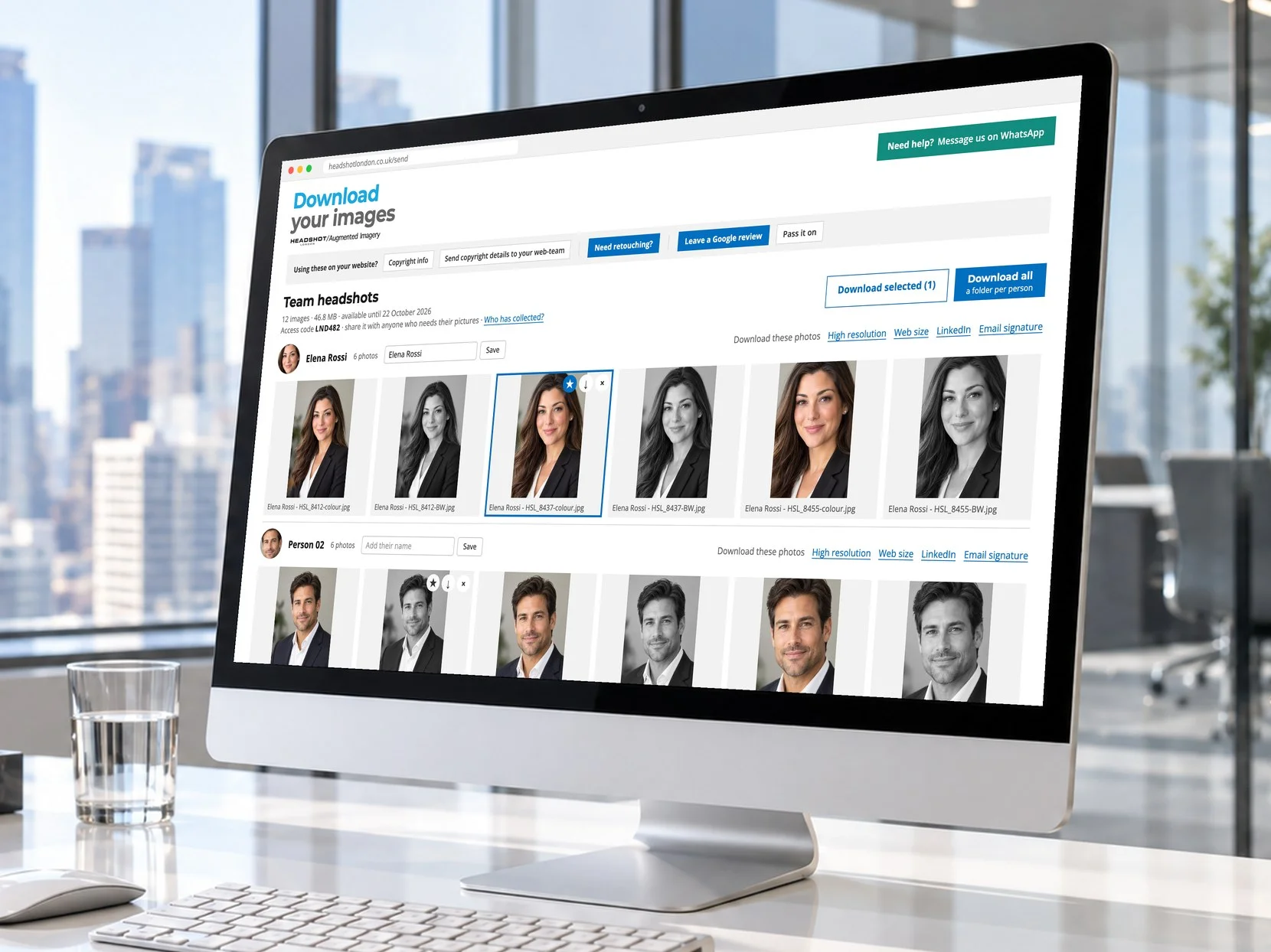
The SEND gallery on a desktop screen: every colleague’s photographs in colour and black and white, ready to download

We built SEND, Headshot London’s own app, to take that workload off your hands. It automates almost everything that happens after the shoot, turning days of admin into minutes. We developed SEND ourselves, and no other photography company has our app.

It’s not the reason to choose us. The quality of our photography comes first. But if you value your time, you’ll appreciate just how much easier SEND makes the whole process.

Days of work in minutes

  • A folder for every person

    Click on ‘Download all’, downloads the entire shoot but divided into a folder for each person, saving you hours of work. Each colleague’s folder of images, ready to forward or file.

  • Identify staff by name

    Type a person’s name in their block, and every photograph downloads with “Their Name - HSL_0214.jpg”. The original number stays, so any picture can be traced by us in seconds.

  • Their whole set in one click

    Each colleague can download all of their own photographs at once, from the button beside their face, in the version they need, such as the LinkedIn crop.


Every photograph, four ways

Hi-res

The full original file, for print, press and annual reports.

Web

2,000 pixels on the longest side, ready for your website.

Email

A small square for email signatures, so every message carries a face.

LinkedIn

A 1,200-pixel square, cropped around the face, ready to upload.

The result is a team shoot that fits into your working week instead of taking it over. To book, call 07940 444641 or email [email protected].

Headshot London was founded by David Locke in 2007. You can read more about his background on his founder page.

Questions from shoot organisers

What if my boss asks me to send every colleague their own photographs?

A few minutes instead of half a day. Sorting a team shoot by hand means opening hundreds of frames, working out who is who and building a folder for each person. With SEND, one click on “Download all” gives you the whole shoot already sorted, with a folder for each colleague, ready to forward. Type each person’s name under their face once, and every file in their folder carries their name too. Each folder comes in the version you need: full resolution, web size, the LinkedIn square or the email-signature square. Hours of frustration become one download, and you can tell your boss it is done.

Can the photos be named after each person?

Yes. Type a name under a face in the gallery and every photograph in that person’s set downloads with their name in front, such as “Cara Jones - HSL_0214.jpg”. The original file number stays in the name, so if anyone asks us about a particular picture, we can find it straight away. Your colleagues’ folders arrive named and ready to file, with no renaming by hand.

Do I have to send everyone their photographs after the shoot?

No. You receive one private gallery for the whole shoot, and colleagues collect their own pictures from it. Nobody needs to sort files, match names to faces or forward individual emails. If your company prefers a single download point, you can still have one.

How will colleagues find their own pictures?

Face recognition groups each person’s photographs together, even when they were photographed in more than one location during the shoot. Each person finds their own set without scrolling through the rest of the company.

Can I download the whole shoot myself?

Yes. One click on “Download all” downloads the complete set as a single file, at full quality, already sorted into a folder for each person. Each colleague can also download their own photographs in one click, from the button beside their face, without selecting them one by one.

Will the pictures be ready for LinkedIn and email signatures?

Yes. Every image downloads in four versions: the full high-resolution file, a 2,000-pixel version for the website, a 1,200-pixel square for LinkedIn and a small square for email signatures. The squares are centred on the face automatically, so nobody asks you to crop their picture.

How do I know who still needs to download their photographs?

A “Who has collected?” panel in the gallery shows how many people have opened it, how many have downloaded and how many days remain. You see the faces of the people still to collect, so you recognise them at a glance instead of reading file names. A ready-written reminder, with the link and the closing date, copies to your clipboard in one click.

Will I have to chase people?

Less than before. We email you if the gallery has not been opened after three days, and again two days before it closes, so the deadline never comes as a surprise.

What happens when someone wants their picture retouched?

They order it themselves. Each person chooses “Retouch this image” on their own photograph, describes the change and pays online at £50 + VAT per image. We deal with them directly, so retouching requests and payments never pass through you. Anyone can also ask a question from the same place without paying.

Who answers colleagues’ questions about their pictures?

We do. The gallery has a WhatsApp button that reaches us directly from 8am to 7pm every day, including evenings, when people often look at their photographs at home. Questions come to us rather than to your inbox.

What do I send to our web team?

Nothing extra to write. One button in the gallery sends the photo credit and copyright wording to your web team, ready to paste wherever the images are published. The credit is also embedded in each image file.

How long is the gallery open, and what if I am on leave?

The gallery stays open for ten days, with the closing date shown at the top. We can send the same gallery to a colleague who is covering for you, and if anyone misses the window, we can open it again on request.

Is the gallery private?

Yes. Each gallery opens only with its private link or access code, and search engines are told not to list it. The face detection that crops the LinkedIn squares runs on our own systems, and no photograph is sent to an outside service.

Read more about why we built the client gallery, see corporate headshots, or browse the full FAQ.